Next.js (3. Layouts and Pages) 정리

0. 레이아웃과 페이지
Next.js는 파일 시스템 기반 라우팅을 사용한다.
폴더와 파일 이름만으로 라우트를 정의하고, 레이아웃과 페이지를 구성할 수 있다.
1. 페이지와 레이아웃
1-1. 페이지 (Page)
page.js는 특정 라우트에서 렌더링되는 UI다.
app 디렉토리 안에 page 파일을 추가하고 React 컴포넌트를 default export하면 페이지가 된다.

1
2
3
4
5
// app/page.tsx → /

export default function Page() {
  return <h1>Hello Next.js!</h1>
}
1-2. 레이아웃 (Layout)
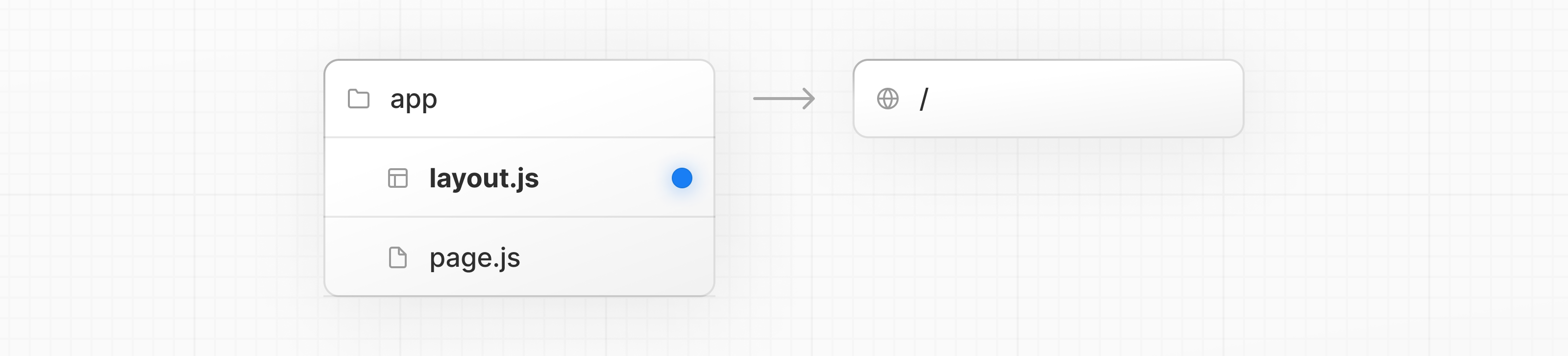
layout.js는 여러 페이지 사이에서 공유되는 UI다.
페이지 이동 시 레이아웃은 상태를 유지하고, 인터랙티브한 상태를 그대로 두며, 리렌더링되지 않는다.
layout 파일에서 React 컴포넌트를 default export하면 레이아웃이 된다.
컴포넌트는 반드시 children prop을 받아야 하며, 이 자리에 하위 페이지 또는 중첩 레이아웃이 들어온다.
1
2
3
4
5
6
7
8
9
10
11
12
13
14
15
// app/layout.tsx

export default function RootLayout({
  children,
}: {
  children: React.ReactNode
}) {
  return (
    <html lang="en">
      <body>
        <main>{children}</main>
      </body>
    </html>
  )
}
app/layout.tsx는 루트 레이아웃(Root Layout)이라고 부른다. 루트 레이아웃은 필수이며, 반드시<html>과<body>태그를 포함해야 한다.
2. 중첩 라우트 (Nested Routes)
2-1. 중첩 라우트 만들기
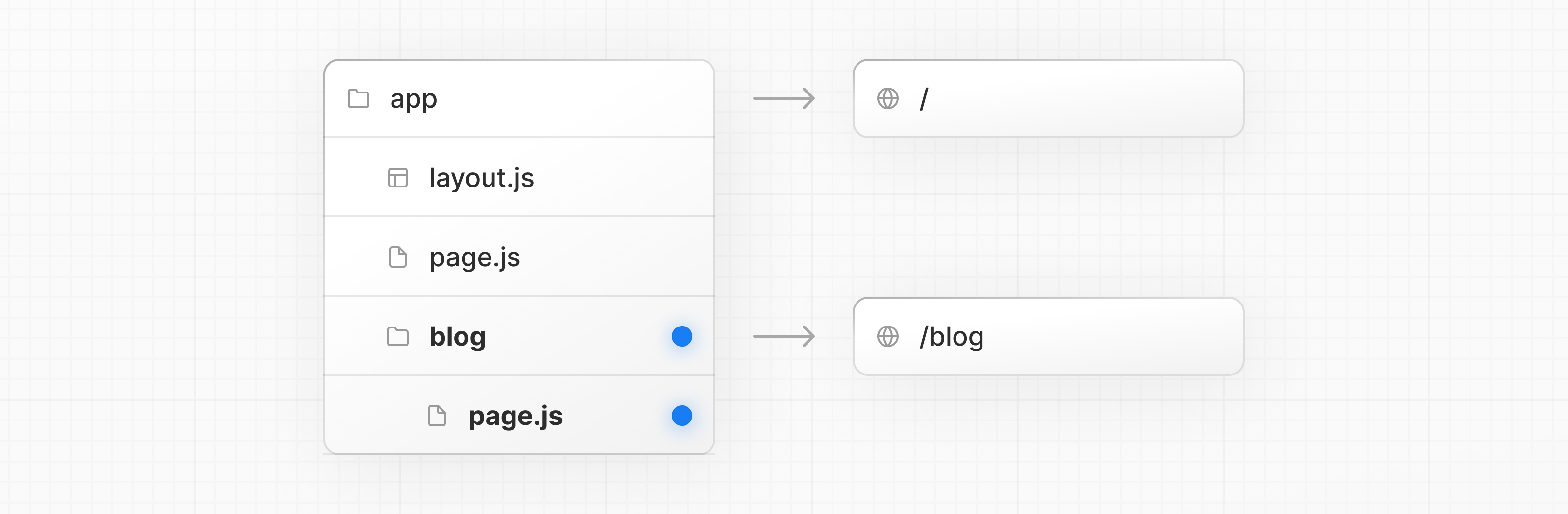
폴더를 중첩하면 URL도 중첩된다.
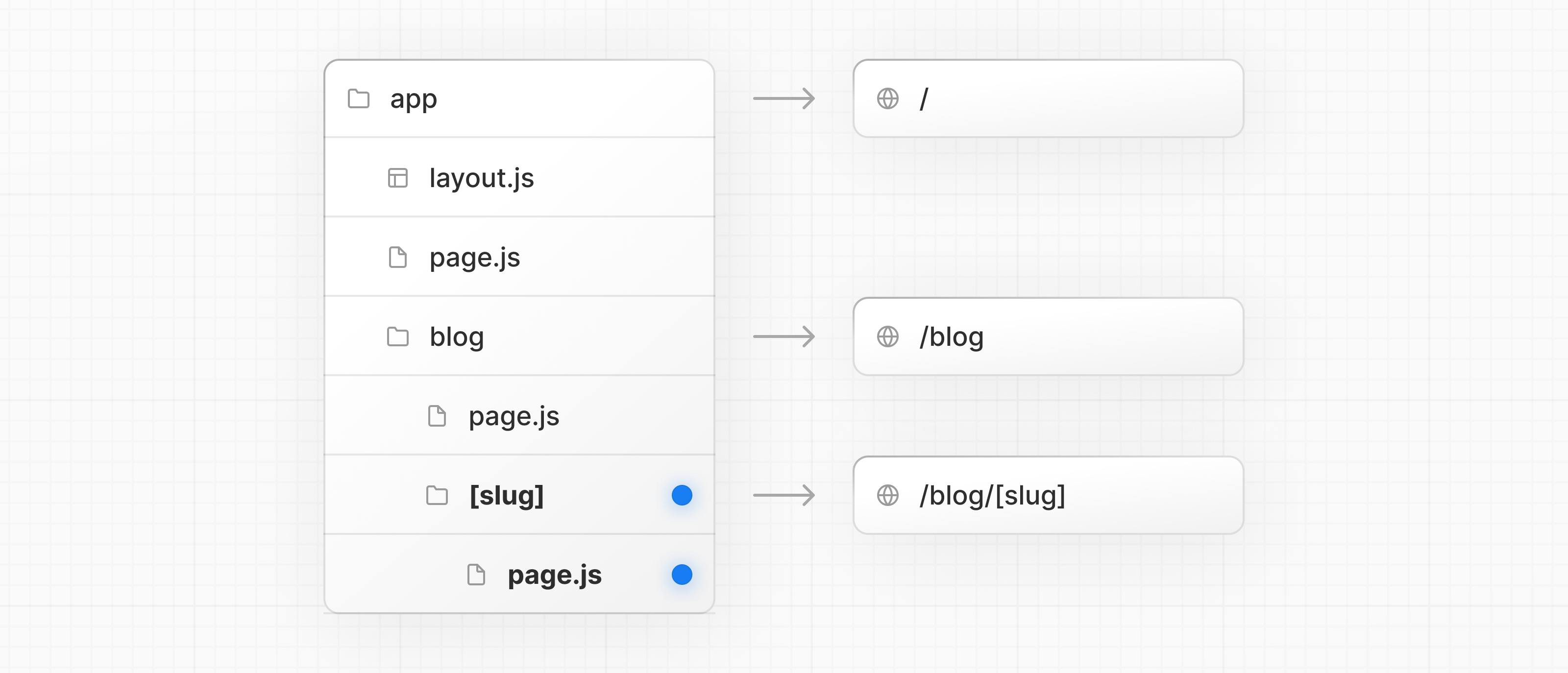
예를 들어, /blog/[slug] 라우트는 아래 세 개의 세그먼트로 구성된다.
/— Root Segmentblog— Segment[slug]— Leaf Segment
Next.js에서:
- 폴더 → URL 세그먼트를 정의한다.
- 파일 (
page,layout) → 해당 세그먼트에서 보여줄 UI를 만든다.
예를 들어, /blog 라우트를 만들려면
app/안에blog폴더를 만든다./blog경로를 외부에서 접근할 수 있도록page.tsx를 추가한다.
1
2
3
4
5
6
7
8
9
10
11
12
13
14
15
16
// app/blog/page.tsx → /blog

import { getPosts } from '@/lib/posts'
import { Post } from '@/ui/post'

export default async function Page() {
  const posts = await getPosts()

  return (
    <ul>
      {posts.map((post) => (
        <Post key={post.id} post={post} />
      ))}
    </ul>
  )
}
폴더를 더 중첩하면 더 깊은 라우트를 만들 수 있다.
예를 들어, 특정 블로그 포스트 라우트(/blog/[slug])를 만들려면
blog안에[slug]폴더를 만든다.page.tsx를 추가한다.
폴더 이름을 대괄호로 감싸면(
[slug]) 동적 라우트 세그먼트가 된다.
블로그 포스트, 상품 페이지처럼 데이터에 따라 여러 페이지를 생성할 때 사용한다.
2-2. 레이아웃 중첩 (Nesting Layouts)
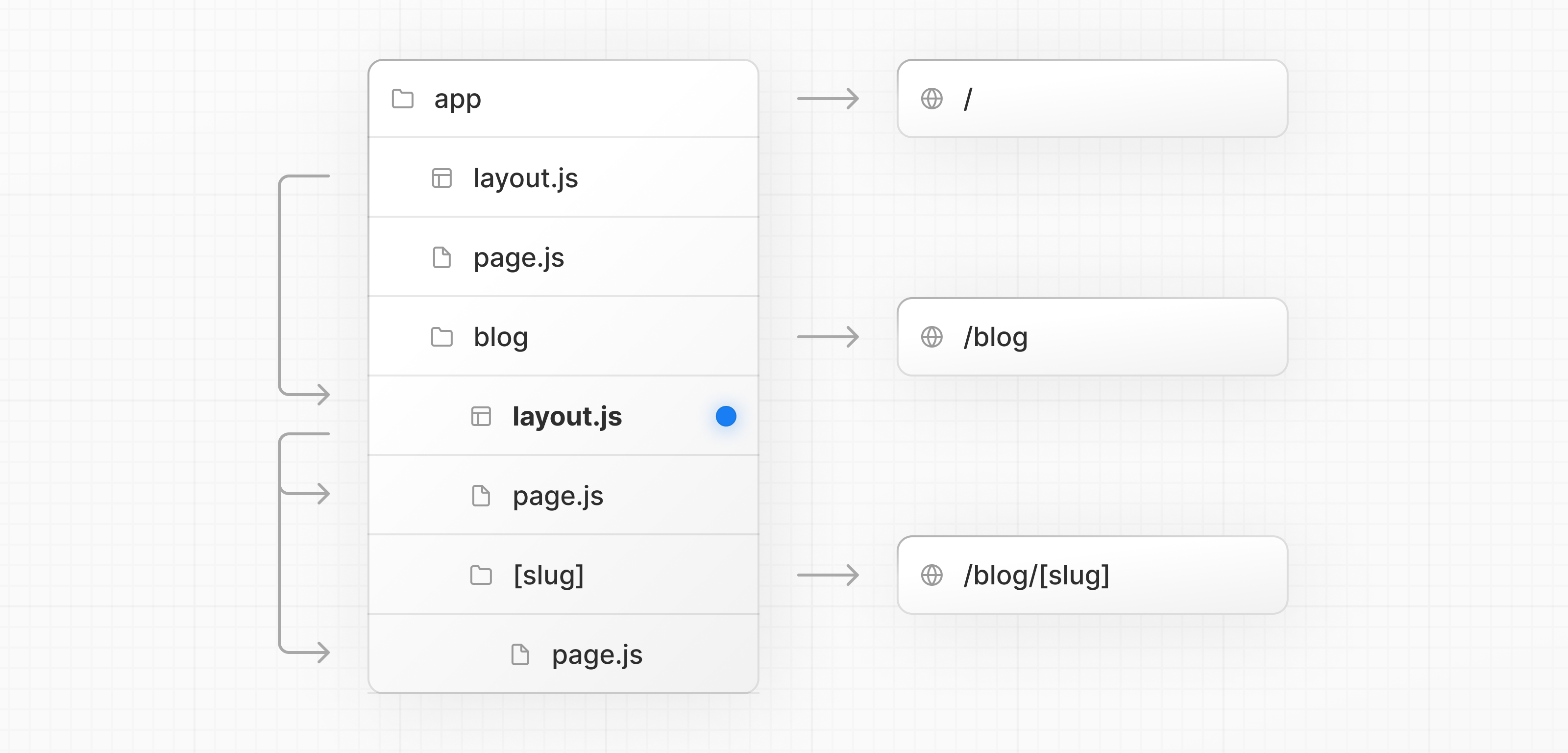
레이아웃도 폴더 계층 구조에 따라 중첩된다.
상위 레이아웃이 하위 레이아웃을 children prop으로 감싸는 방식이다.
예를 들어, /blog 라우트에 레이아웃을 추가하려면 blog 폴더 안에 layout.tsx를 만든다.
1
2
3
4
5
6
7
8
9
// app/blog/layout.tsx

export default function BlogLayout({
  children,
}: {
  children: React.ReactNode
}) {
  return <section>{children}</section>
}
위 두 레이아웃을 합치면 렌더링 구조는 아래와 같다.
1
2
3
4
app/layout.tsx          → 루트 레이아웃
  └── app/blog/layout.tsx   → 블로그 레이아웃
        ├── app/blog/page.tsx         → /blog
        └── app/blog/[slug]/page.tsx  → /blog/my-post
2-3. 동적 세그먼트 (Dynamic Segment)
동적 세그먼트는 데이터에서 라우트를 자동으로 생성할 때 사용한다.
각 블로그 포스트마다 라우트를 일일이 만드는 대신, [slug] 하나로 모든 포스트 페이지를 처리할 수 있다.
동적 세그먼트의 값은 params prop으로 접근한다.
Next.js 15부터 params는 Promise이므로 await이 필요하다.
1
2
3
4
5
6
7
8
9
10
11
12
13
14
15
16
17
// app/blog/[slug]/page.tsx → /blog/my-post

export default async function BlogPostPage({
  params,
}: {
  params: Promise<{ slug: string }>
}) {
  const { slug } = await params
  const post = await getPost(slug)

  return (
    <div>
      <h1>{post.title}</h1>
      <p>{post.content}</p>
    </div>
  )
}
중첩된 레이아웃에서도 동일하게
paramsprop에 접근할 수 있다.
3. 데이터와 내비게이션
3-1. Search Params 렌더링
searchParams prop으로 URL의 쿼리 파라미터를 읽을 수 있다.
Server Component의 page에서만 사용 가능하다.
1
2
3
4
5
6
7
8
9
// app/page.tsx → /?filters=recent

export default async function Page({
  searchParams,
}: {
  searchParams: Promise<{ [key: string]: string | string[] | undefined }>
}) {
  const filters = (await searchParams).filters
}
searchParams를 사용하면 페이지가 동적 렌더링(Dynamic Rendering)으로 전환된다.
요청이 들어올 때마다 쿼리 파라미터를 읽어야 하기 때문이다.
언제 무엇을 쓸까:
| 상황 | 사용할 것 |
|---|---|
| 서버에서 데이터를 로드할 때 (페이지네이션, DB 필터링 등) | searchParams prop |
| 이미 로드된 데이터를 클라이언트에서 필터링할 때 | useSearchParams hook |
| 리렌더링 없이 콜백/이벤트 핸들러에서 읽을 때 | new URLSearchParams(window.location.search) |
3-2. 페이지 간 이동 — Link 컴포넌트
<Link> 컴포넌트는 Next.js에서 라우트 간 이동을 담당하는 기본 방법이다.
HTML <a> 태그를 확장해 프리페칭과 클라이언트 사이드 내비게이션을 지원한다.
next/link에서 <Link>를 import하고 href prop에 경로를 전달한다.
1
2
3
4
5
6
7
8
9
10
11
12
13
14
15
16
17
// app/ui/post.tsx

import Link from 'next/link'

export default async function Post({ post }) {
  const posts = await getPosts()

  return (
    <ul>
      {posts.map((post) => (
        <li key={post.slug}>
          <Link href={`/blog/${post.slug}`}>{post.title}</Link>
        </li>
      ))}
    </ul>
  )
}
더 복잡한 내비게이션이 필요하다면
useRouterhook을 사용할 수 있다.
3-3. Route Props Helpers
Next.js는 라우트 구조에서 params와 슬롯 타입을 자동으로 추론하는 유틸리티 타입을 제공한다.
next dev, next build, next typegen 실행 시 자동 생성되며, 별도 import가 필요 없다.
| 헬퍼 타입 | 용도 |
|---|---|
PageProps | page 컴포넌트의 props 타입 (params, searchParams 포함) |
LayoutProps | layout 컴포넌트의 props 타입 (children, named slots 포함) |
1
2
3
4
5
6
// app/blog/[slug]/page.tsx

export default async function Page(props: PageProps<'/blog/[slug]'>) {
  const { slug } = await props.params
  return <h1>Blog post: {slug}</h1>
}
1
2
3
4
5
6
7
8
9
10
// app/dashboard/layout.tsx

export default function Layout(props: LayoutProps<'/dashboard'>) {
  return (
    <section>
      {props.children}
      {/* @analytics 슬롯이 있다면 props.analytics로 접근 */}
    </section>
  )
}
- 정적 라우트의 경우
params는{}로 resolve된다.PageProps,LayoutProps는 전역 헬퍼이므로 import 없이 바로 사용 가능하다.