Next.js (10. Error Handling) 정리
0. 에러 처리
에러는 예상 에러(Expected Errors)와 예상치 못한 에러(Uncaught Exceptions) 두 가지로 나뉜다.
| 유형 | 설명 | 처리 방식 |
|---|---|---|
| 예상 에러 | 폼 유효성 검사, 요청 실패 등 정상 흐름에서 발생 가능한 에러 | 반환값으로 명시적 처리 |
| 예상치 못한 에러 | 버그나 예외 상황으로 발생하는 에러 | 에러를 throw해 에러 바운더리가 처리 |
1. 예상 에러 처리
1-1. Server Functions — useActionState
Server Function에서 발생하는 예상 에러는 try/catch 대신 반환값으로 처리한다.
useActionState 훅에 액션을 전달하고, 반환된 state로 에러 메시지를 표시한다.
1
2
3
4
5
6
7
8
9
10
11
12
13
14
15
16
17
// app/actions.ts

'use server'

export async function createPost(prevState: any, formData: FormData) {
  const title = formData.get('title')
  const content = formData.get('content')

  const res = await fetch('https://api.vercel.app/posts', {
    method: 'POST',
    body: { title, content },
  })

  if (!res.ok) {
    return { message: '포스트 생성에 실패했습니다.' }
  }
}
1
2
3
4
5
6
7
8
9
10
11
12
13
14
15
16
17
18
19
20
21
22
23
24
25
// app/ui/form.tsx

'use client'

import { useActionState } from 'react'
import { createPost } from '@/app/actions'

const initialState = {
  message: '',
}

export function Form() {
  const [state, formAction, pending] = useActionState(createPost, initialState)

  return (
    <form action={formAction}>
      <label htmlFor="title">제목</label>
      <input type="text" id="title" name="title" required />
      <label htmlFor="content">내용</label>
      <textarea id="content" name="content" required />
      {state?.message && <p aria-live="polite">{state.message}</p>}
      <button disabled={pending}>포스트 작성</button>
    </form>
  )
}
1-2. Server Components — 조건부 반환
Server Component에서 데이터를 페칭할 때 응답 상태에 따라 에러 메시지를 조건부로 반환한다.
1
2
3
4
5
6
7
8
9
10
11
12
// app/page.tsx

export default async function Page() {
  const res = await fetch(`https://...`)
  const data = await res.json()

  if (!res.ok) {
    return '에러가 발생했습니다.'
  }

  return '...'
}
1-3. Not Found — notFound()
라우트 세그먼트에서 notFound()를 호출하면 not-found.tsx의 404 UI를 표시한다.
1
2
3
4
5
6
7
8
9
10
11
12
13
14
15
16
17
18
19
// app/blog/[slug]/page.tsx

import { notFound } from 'next/navigation'
import { getPostBySlug } from '@/lib/posts'

export default async function Page({
  params,
}: {
  params: Promise<{ slug: string }>
}) {
  const { slug } = await params
  const post = getPostBySlug(slug)

  if (!post) {
    notFound()
  }

  return <div>{post.title}</div>
}
1
2
3
4
5
// app/blog/[slug]/not-found.tsx

export default function NotFound() {
  return <div>404 - 페이지를 찾을 수 없습니다.</div>
}
2. 예상치 못한 에러 처리
2-1. error.tsx — 에러 바운더리
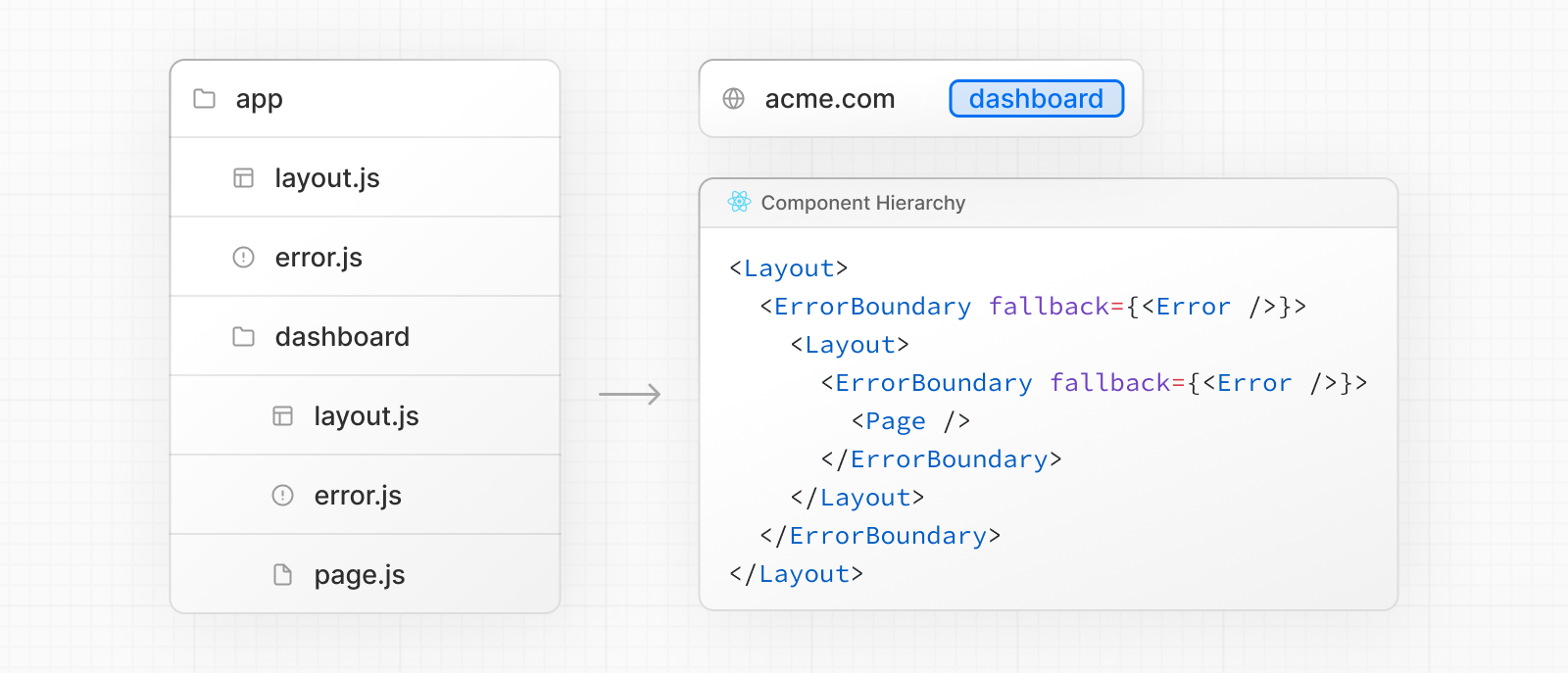
라우트 세그먼트 안에 error.tsx 파일을 추가하면 해당 구간의 에러 바운더리가 생성된다.
에러 바운더리는 하위 컴포넌트에서 발생한 에러를 잡아 크래시 대신 폴백 UI를 표시한다.
1
2
3
4
5
6
7
8
9
10
11
12
13
14
15
16
17
18
19
20
21
22
23
24
25
26
27
28
29
30
31
32
// app/dashboard/error.tsx

'use client' // 에러 바운더리는 반드시 Client Component여야 한다

import { useEffect } from 'react'

export default function ErrorPage({
  error,
  unstable_retry,
}: {
  error: Error & { digest?: string }
  unstable_retry: () => void
}) {
  useEffect(() => {
    // 에러 리포팅 서비스에 에러를 기록한다
    console.error(error)
  }, [error])

  return (
    <div>
      <h2>오류가 발생했습니다!</h2>
      <button
        onClick={
          // 세그먼트를 다시 페칭하고 렌더링해 복구를 시도한다
          () => unstable_retry()
        }
      >
        다시 시도
      </button>
    </div>
  )
}
에러는 가장 가까운 상위 에러 바운더리까지 전파된다. 라우트 계층의 여러 위치에 error.tsx를 배치하면 세분화된 에러 처리가 가능하다.
2-2. unstable_catchError — 커스텀 에러 바운더리
unstable_catchError를 사용하면 컴포넌트 트리의 특정 부분을 감싸는 커스텀 에러 바운더리를 만들 수 있다.
1
2
3
4
5
6
7
8
9
10
11
12
13
14
15
16
17
18
19
20
// app/custom-error-boundary.tsx

'use client'

import { unstable_catchError as catchError, type ErrorInfo } from 'next/error'

function ErrorFallback(
  props: { title: string },
  { error, unstable_retry }: ErrorInfo
) {
  return (
    <div>
      <h2>{props.title}</h2>
      <p>{error.message}</p>
      <button onClick={() => unstable_retry()}>다시 시도</button>
    </div>
  )
}

export default catchError(ErrorFallback)
반환된 컴포넌트를 레이아웃이나 페이지에서 래퍼로 사용한다.
1
2
3
4
5
6
7
// app/some-component.tsx

import ErrorBoundary from './custom-error-boundary'

export default function Component({ children }: { children: React.ReactNode }) {
  return <ErrorBoundary title="대시보드 에러">{children}</ErrorBoundary>
}
2-3. 이벤트 핸들러 에러 처리
에러 바운더리는 렌더링 중 발생한 에러만 잡는다. 이벤트 핸들러나 비동기 코드에서 발생한 에러는 useState로 직접 처리한다.
1
2
3
4
5
6
7
8
9
10
11
12
13
14
15
16
17
18
19
20
21
22
23
24
25
26
// 이벤트 핸들러 에러 처리 예시
'use client'

import { useState } from 'react'

export function Button() {
  const [error, setError] = useState(null)

  const handleClick = () => {
    try {
      throw new Error('Exception')
    } catch (reason) {
      setError(reason)
    }
  }

  if (error) {
    /* 폴백 UI 렌더링 */
  }

  return (
    <button type="button" onClick={handleClick}>
      클릭
    </button>
  )
}
useTransition의startTransition내부에서 처리되지 않은 에러는 가장 가까운 에러 바운더리로 전파된다.
3. 전역 에러 처리 — global-error.tsx
루트 레이아웃에서 발생한 에러는 app/global-error.tsx로 처리한다. 활성화되면 루트 레이아웃을 대체하므로 반드시 <html>과 <body> 태그를 포함해야 한다.
1
2
3
4
5
6
7
8
9
10
11
12
13
14
15
16
17
18
19
20
21
// app/global-error.tsx

'use client' // 에러 바운더리는 반드시 Client Component여야 한다

export default function GlobalError({
  error,
  unstable_retry,
}: {
  error: Error & { digest?: string }
  unstable_retry: () => void
}) {
  return (
    // global-error는 html과 body 태그를 포함해야 한다
    <html>
      <body>
        <h2>오류가 발생했습니다!</h2>
        <button onClick={() => unstable_retry()}>다시 시도</button>
      </body>
    </html>
  )
}